How to implement a Simple RAG system in Python?
Enter Broccoli-RAG
What is RAG?
Let's say you want to call a LLM and you want to ask it a very specific information, that it might not know anything about. For example an internal doc.
Simple solution might be just putting the whole doc inside the prompt, but what if the doc is too big?
In that case we might want to give it only a part of that document. We can cut that doc into pieces.
We will store each piece using a vector representation (basically turning text into numbers). Then we will also transform the user's prompt into a vector representation and find the relevant data.
Then we will feed this data into the actual prompt to the LLM.
You can read more about it, for example here. I simplified it too much, but you get the general idea.
The plan
Ok, so let's implement this idea in practice.
We will create an API with 2 endpoints: 1) Adding a document to our vector database. We will support PDF and DOCX files only. No need to get too fancy here. 2) Retrieving the relevant info from the vector DB and feeding it to the LLM and returning its response
We need:
-
Python for writing the code
-
FastAPI to write the relevant API endpoints, so we can actually interact with the model
-
Qdrant for vector DB
-
Ollama to run a LLM model locally without too much hustle
-
Docker so the installation of everything is swift and easy
The execution
Folder structure:
project
   - README.md
   - requirements.txt
   - Makefile
   - Dockerfile
   - docker-compose.yaml
   - ./src
       - .env
       - logger.py
       - main.py
       - rag.py
       - settings.py
       - vdb.py
Docker setup
Dockerfile, which will be our base for fastAPI backend, nothing complicated here:
FROM python:3.10-slim

WORKDIR /src

COPY requirements.txt .

RUN pip install --no-cache-dir -r requirements.txt

RUN apt update
RUN apt install -y make curl

COPY ./src .

ENV PYTHONPATH=/

EXPOSE 8080

CMD ["uvicorn", "main:app", "--host", "0.0.0.0", "--port", "8080", "--reload", "--reload-dir", "/src", "--reload-include", "*.sql"]
Now to the docker-compose:
We will deploy ollama using their public image. I think ollama is great for a simple local presentation, I didn't have much problem with it. For something bigger we might think about using vLLM, but we're good.
The last 4 lines are related to usage of GPU instead of CPU for model calculations.
  ollama:
    image: ollama/ollama:latest
    container_name: ollama
    ports:
      - "11434:11434"
    volumes:
      - ./src/ollama_data:/root/.ollama
    restart: unless-stopped
    deploy: { }
    runtime: nvidia
    environment:
      - NVIDIA_VISIBLE_DEVICES=all
For Qdrant we will also use their public image:
  qdrant:
    restart: always
    image: qdrant/qdrant:latest
    ports:
      - "6333:6333"
    volumes:
      - ./src/qdrant_data:/qdrant/storage
And finally backend:
  backend:
    build: .
    container_name: backend
    ports:
      - "8080:8080"
    volumes:
      - ./src:/src
    depends_on:
      - qdrant
I will also add a Makefile, like a person:
up:
    docker compose up -d
    docker compose exec ollama ollama pull gemma3:4b
That way we will also pull the relevant model to the ollama that we want to use automatically.
Infra is ready let's move into the code
Python code
I added a .env.template file that needs to be copied into a .env:
QDRANT_HOST=http://qdrant:6333
QDRANT_MAIN_COLLECTION_NAME=docs
LLM_HOST=http://ollama:11434/api/generate
Notice that instead of localhost we are using qdrant and ollama. It's how docker-compose translates the URLs
between the containers.
We will extract these variables using pydantic-settings:
# settings.py

class Settings(BaseSettings):
    qdrant_host: str
    qdrant_main_collection_name: str
    llm_host: str

    model_config = SettingsConfigDict(
        env_file=Path(__file__).parent / ".env",
        env_file_encoding="utf-8",
    )


settings = Settings()
We will use the settings variable as a singleton object across all the files.
Lets setup the Virtual DB now:
# vdb.py
from fastembed import TextEmbedding
from qdrant_client import QdrantClient
from qdrant_client.http import models

from src.settings import settings

embedder = TextEmbedding(model_name="BAAI/bge-small-en")

collection = settings.qdrant_main_collection_name
# our singleton object
client = QdrantClient(settings.qdrant_host)

if not client.collection_exists(collection):
    client.create_collection(
        collection,
        vectors_config=models.VectorParams(size=384, distance=models.Distance.COSINE),
    )
We are using the fastembed to creating text embeddings - so actually transforming text into a vector representation.
We will create a default collection if it doesn't exist already. We will create it with size of 384,
because that's what our embedding model uses. For distance we will be using COSINE approach, as it seems
to be the best one for semantic search here. There are a few others, but we won't cover them here.
Let`s create functions to extract texts from PDF and DOCX documents.
# rag.py

def _read_pdf(file_bytes: bytes) -> List[str]:
    reader = PdfReader(io.BytesIO(file_bytes))

    text = []
    for page in reader.pages:
        text.append(page.extract_text() or "")
    return text


def _read_docx(file_bytes: bytes) -> List[str]:
    # maybe too "one-liney" but we just read the paragraphs from the file, basically
    return [p.text for p in Document(io.BytesIO(file_bytes)).paragraphs]
Now how do we turn those list of strings into smaller pieces? The LLM doesn't care about the actual length about the text, but about the tokens. So lets cut it based on toke number:
ENCODER = tiktoken.get_encoding("cl100k_base")
TOKENS_PER_CHUNK = 250

def _text_into_chunks(contents: List[str]):
    chunks = []

    for content in contents:
        tokens = ENCODER.encode(content)
        start = 0
        while start < len(tokens):
            end = start + TOKENS_PER_CHUNK
            chunk_tokens = tokens[start:end]
            chunk_text = ENCODER.decode(chunk_tokens)
            chunks.append(chunk_text)
            start += end

    return chunks
We used tiktoken here. But we could use anything else.
Now, let's use all those functions together:
def _embed(text: str):
    return list(embedder.embed([text]))[0]

def insert_into_vdb(file: UploadFile):
    if file.content_type == "application/pdf":
        contents = _read_pdf(file.file.read())
    elif (
        file.content_type
        == "application/vnd.openxmlformats-officedocument.wordprocessingml.document"
    ):
        contents = _read_docx(file.file.read())
    else:
        raise HTTPException(status_code=HTTP_400_BAD_REQUEST, detail="Wrong file type")

    chunks = _text_into_chunks(contents)

    logger.debug(f"Chunks generated: {chunks}")

    client.upsert(
        settings.qdrant_main_collection_name,
        models.Batch(
            ids=[str(uuid.uuid4()) for _ in chunks],
            vectors=[_embed(chunk) for chunk in chunks],
            payloads=[{"text": chunk} for chunk in chunks],
        ),
    )
Let's explain step by step: First, we check the type of file and use the proper function to extract its contents:
    if file.content_type == "application/pdf":
        contents = _read_pdf(file.file.read())
    elif (
        file.content_type
        == "application/vnd.openxmlformats-officedocument.wordprocessingml.document"
    ):
        contents = _read_docx(file.file.read())
    else:
        raise HTTPException(status_code=HTTP_400_BAD_REQUEST, detail="Wrong file type")
We then turn this text into chunks, based on tokens:
chunks = _text_into_chunks(contents)
And finally we add them to the vector database. We assign an unique id to each chunk using uuid.
We use our _embed() function to turn each chunk into vector representation.
And most importantly we store the actual text. We need to assign it to each vector,
we don't want to "de-translate" vectors into text.
    client.upsert(
        settings.qdrant_main_collection_name,
        models.Batch(
            ids=[str(uuid.uuid4()) for _ in chunks],
            vectors=[_embed(chunk) for chunk in chunks],
            payloads=[{"text": chunk} for chunk in chunks],
        ),
    )
What about the search?
def _search_vdb(text: str):
    results = client.query_points(
        settings.qdrant_main_collection_name,
        _embed(text),
        limit=3,
        score_threshold=0.75,
    )
    text = ""
    if results.points:
        for r in results.points:
            text += r.payload.get("text", "") + "\n"
    return text


def get_rag_context(text: str):
    return _search_vdb(text)
We will transform the input text into embedding and query the vector DB. We will limit our results to 3. We will also add a score threshold, because we don't want to return anything we find lol.
The actual API in FastAPI is pretty straightforward since we now have everything we need:
# main.py
app = FastAPI()


@app.post("/add-rag-doc", status_code=HTTP_202_ACCEPTED, description="This endpoint allows upload of WORD and PDF docs.")
def add_rag_doc(file: UploadFile):
    insert_into_vdb(file)
    return "success"


@app.post("/chat", status_code=HTTP_200_OK)
def chat(prompt: str):
    prompt = (
        f"""PROMPT: {prompt} \n CONTEXT:\n {get_rag_context(prompt)} \n MAX 50 WORDS"""
    )
    logger.debug(f"sending prompt: `{prompt}` to local model")

    body = {"model": "gemma3:4b", "prompt": prompt, "stream": False}
    response = requests.post(url=settings.llm_host, json=body).text
    model_response = json.loads(response).get("response", "")
    return model_response
I added the "MAX 50 WORDS" to the prompt so the response is faster, as my GPU is on life-support.
That's it
Now we can enjoy the fruit of our labour and run make up and go to http://localhost:8080/docs/.
Two endpoints that we just created will be waiting for us there.
For my cinephile readers, I uploaded 2 PDF files with synopses of Casablanca and Wall Street movies.
The result is pretty nice:
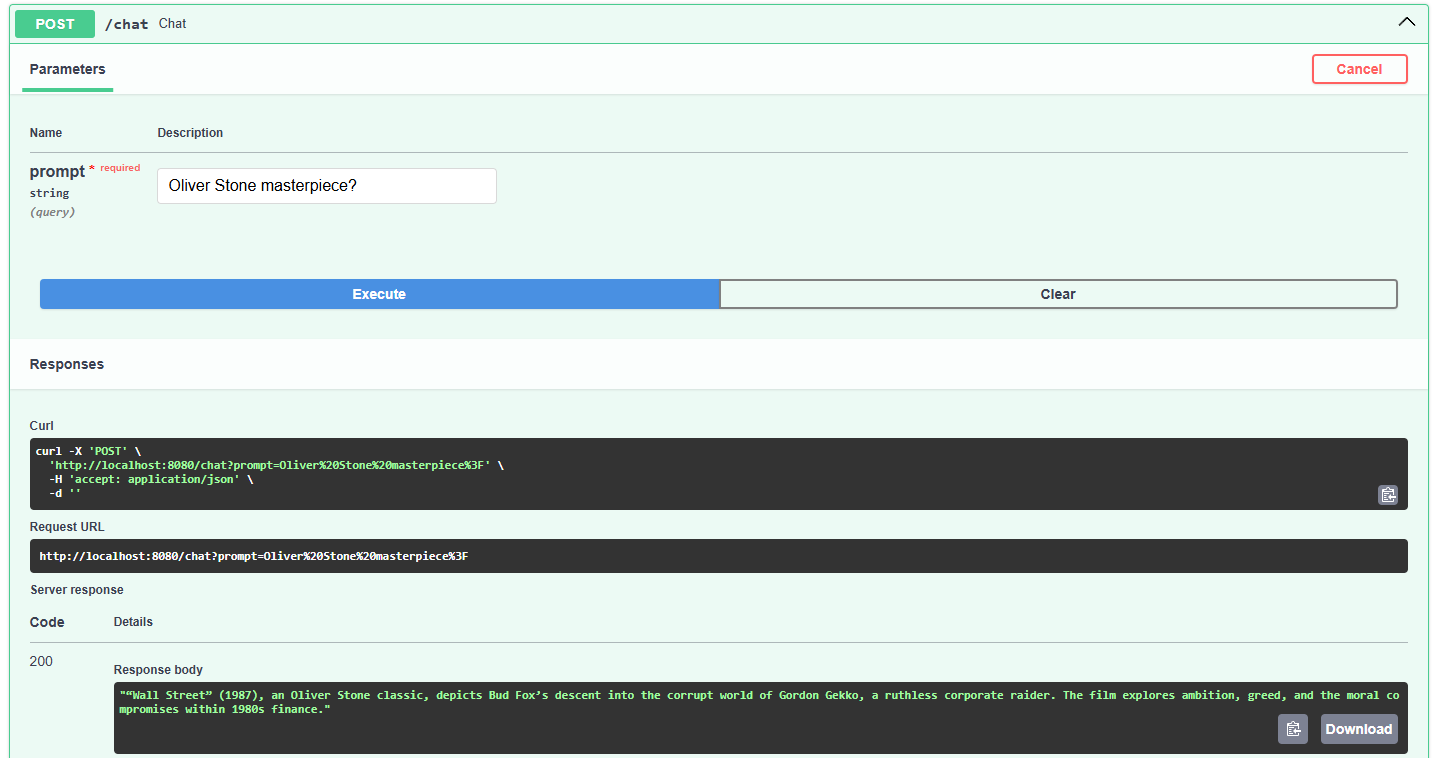
This is it. It's very simple, but it should just showcase the general idea.
Thanks for reading. I am still experimenting with this blog, a lot of improvements ahead, but gotta start somewhere lol